Build your environment
Place sources and receivers on the map. Add buildings, barriers and ground zones to describe your site.
Turn acoustic data into a clearer picture. Model sound propagation, explore mitigation options and bring your results to life in 2D and 3D.
A connected workflow for building your model, exploring its impact and communicating your findings.
Place sources and receivers on the map. Add buildings, barriers and ground zones to describe your site.
Read noise contours in 2D, inspect the scene in 3D and explore contributions at individual receivers.
Test mitigation alternatives, compare receiver results and prepare printable technical reports.
Explore how a model can inform the next decision in your acoustic study.
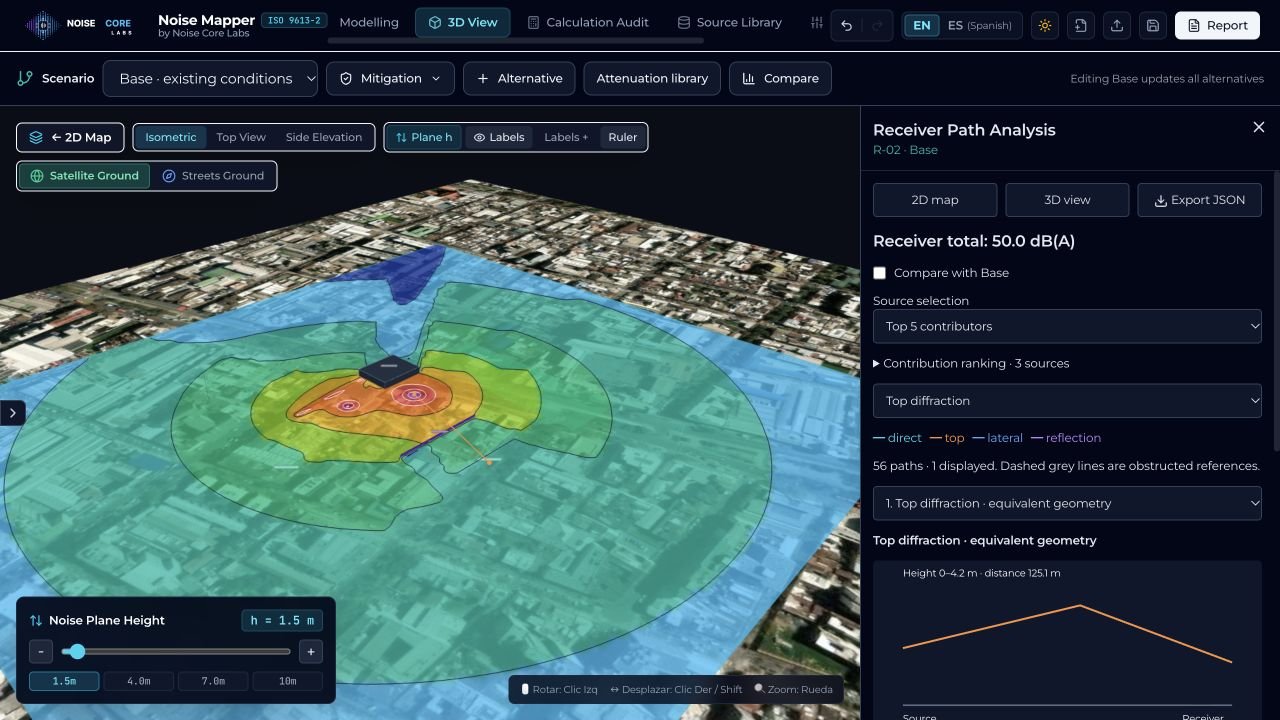
Model multiple sources and inspect their contributions at receivers. Use the 3D view to understand the relationship between the source, the site and the propagation path.
Actual Noise Mapper interface · example scenarioThree planned levels of access, from exploring your first model to detailed consulting work.
A first step into acoustic modelling with small, focused scenarios.
More modelling tools for everyday studies and mitigation assessment.
Deeper analysis for complex models and comprehensive deliverables.
| Capability | Free | Professional | Consultant |
|---|---|---|---|
| Source types | Point | Point, line, area | All types |
| Visualisation | 2D + basic 3D | 2D + full 3D | 2D + full 3D |
| Scenarios | Base | Base + alternatives | Extended alternatives |
| Receiver analysis | Total level | Bands & contributions | Detailed diagnostics |
| Reports | Summary | Technical | Comparative & detailed |
| Save local projects | Included | Included | Included |
Yes. The current application runs in your browser, including its acoustic calculations. Internet access is needed for basemaps and address search.
Save and reopen projects as JSON files on your device. Keep a copy of your project files; cloud project synchronisation is not currently part of the application.
The current software supports mitigation scenarios, receiver comparisons and printable reports to help examine the effect of your modelling choices.
The engine is developed with ISO 9613-2:2024 as its calculation reference. Independent normative validation remains pending. Review the documented assumptions and limitations when assessing results.
Noise Mapper is preparing for browser access.
The application link will be available here when access opens.